Palette Editor Panel
From Synfig Studio :: Documentation
m (Corrected typos) |
m (Proper categorization) |
||
| Line 1: | Line 1: | ||
| − | <!-- | + | <!-- Page info --> |
| + | {{Title|Palette Editor Panel}} | ||
[[Category:Panels]] | [[Category:Panels]] | ||
| + | <!-- Page info end --> | ||
http://i170.photobucket.com/albums/u243/zenoscope/palette_editor.png | http://i170.photobucket.com/albums/u243/zenoscope/palette_editor.png | ||
Here you can add, edit or delete colors from your document. A right click on a color gives you 2 options: color (to edit the color) and delete (to delete it). | Here you can add, edit or delete colors from your document. A right click on a color gives you 2 options: color (to edit the color) and delete (to delete it). | ||
Revision as of 15:00, 6 September 2009
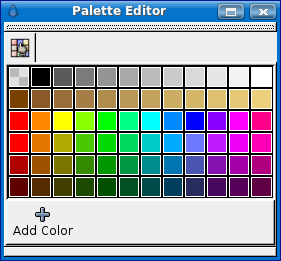
Here you can add, edit or delete colors from your document. A right click on a color gives you 2 options: color (to edit the color) and delete (to delete it).
 |
Language: |
English |

